

Understanding Workflow Automation
What Is Workflow Automation?
Workflow automation is the digital orchestration of repetitive business processes like approvals, task routing, notifications, and data flows, using software to eliminate manual intervention and centralise process execution.
As businesses scale, coordinating work through emails, spreadsheets, and approval chains creates three persistent problems: delays (approvals wait for human intervention), errors (manual data entry introduces mistakes), and opacity (no one knows where a request stands). Workflow automation solves these by digitising approvals, routing tasks automatically, triggering notifications, and updating records in a centralised environment.
Organisations that implement workflow automation report significant operational improvements: faster cycle times, fewer data errors, better visibility into process bottlenecks, and the ability to scale without proportionally increasing headcount.
Why This Matters Now?
Digital workflow automation is no longer a “nice-to-have.” As enterprises manage growing operational complexity, multi-department approvals, compliance requirements, and real-time coordination, manual processes create a widening bottleneck. Every approval waiting for an email response, every manual data entry step, and every status update that requires follow-up adds operational drag.
Low-code workflow automation changes this approach by enabling operations teams to build workflows visually through drag-and-drop builders and pre-built components instead of waiting for lengthy development cycles.
As a result, organisations can:
-
Deploy internal tools faster, often within weeks instead of months
-
Adapt workflows quickly as business requirements evolve
-
Reduce dependency on IT teams by allowing operations teams to participate directly in workflow design and optimisation
Traditional enterprise workflow development often takes 12 to 18 months to implement fully. In contrast, low-code automation platforms allow organisations to configure and deploy workflow solutions much faster using scalable tools designed for enterprise and industrial operations.

Low-code workflow automation is the use of visual development tools to design, automate, and manage business processes with minimal manual coding. Instead of building workflows from scratch through traditional software development, teams use drag-and-drop workflow builders, configurable business logic, and API integrations to create automated operational workflows faster.
These workflows help organisations automate repetitive and process-driven activities across departments. This includes approvals, task assignments, notifications, compliance tracking, and data movement between systems.
What Does Low-Code Workflow Automation Do?
Low-code workflow automation helps businesses standardise and streamline internal operations by automating:
-
Multi-level approvals with routing, delegation, and escalation rules
-
Task assignments based on workflows, availability, or predefined conditions
-
Notifications and alerts triggered by workflow events
-
Data flows between systems with validation and automatic record updates
-
Compliance tracking through audit trails and process documentation
As a result, processes run consistently regardless of team size, operational complexity, or transaction volume.
Why Organisations Are Adopting Low-Code Workflow Automation?
Traditional process automation often depends heavily on development teams. Consequently, workflow changes take time, development backlogs increase, and operational teams struggle to adapt processes quickly.
Low-code workflow automation changes this approach. Operations teams can directly participate in workflow creation and optimisation without relying entirely on developers. Therefore, organisations can:
-
Reduce dependency on lengthy development cycles
-
Deploy internal tools and workflows faster
-
Standardise operational processes across teams
-
Improve process visibility and accountability
-
Adapt workflows quickly as business requirements evolve
In addition, automated workflows reduce manual effort, improve accuracy, and help teams focus on higher-value operational decisions.
Low-Code vs. No-Code vs. Custom Development: The Difference
| Workflow Complexity | Simple, linear sequences | Complex, multi-level approvals, parallel paths, integrations | Unlimited |
| Customisation | Limited (template-based) | Deep customisation, business logic, conditional routing | Fully custom |
| Integration | Basic (50-200 pre-built connectors) | Enterprise integrations, APIs, databases, legacy systems | Any system |
| Time to Deploy | Weeks | 4-12 weeks | 6-18 months |
| Technical Skills Required | None (business users) | Low (visual + some configuration) | High (developers) |
| Best For | Marketing automation, simple approvals | Industrial operations, multi-department workflows | Highly specialised workflows |
Low-code is the middle ground: More flexible than no-code, faster than custom development, accessible to operations teams without engineering skills.
Benefits of Low-Code Workflow Automation for Internal Teams
Organisations that implement low-code workflow automation consistently report improvements across five critical operational dimensions:
1. Speed: Eliminate Approval Delays
Manual approvals wait for human availability. An invoice routed to a manager travelling internationally sits in limbo for days. An access request waits for the IT team's weekly review cycle.
Automated workflows eliminate this wait:
-
Approvals route to the next available approver automatically
-
Escalation rules trigger if an approval exceeds SLA thresholds
-
Process steps execute immediately when preceding steps complete
Real impact: Organisations report reducing approval cycle times from 2–3 days (manual) to 2–4 hours (automated), resulting in a 60–80% reduction.
2. Visibility: Know Status Without Chasing
Plant heads and operations directors spend significant time chasing status updates: “Where is this request?” “Has the budget been approved?” “Why is this order stuck?”
Automated workflows create a complete audit trail. Real-time dashboards show:
-
Current status of every open request
-
Bottlenecks, including pending approvals and triggered escalations
-
Performance metrics such as average cycle time and SLA compliance
-
Team workload visibility, including who is overloaded and who is available
Teams stop spending time on status inquiries and start focusing on decisions.
3. Fewer Errors: Eliminate Manual Data Entry
Manual data entry is one of the largest sources of operational error in most organisations. Invoice amounts get transposed. Part numbers are mistyped. Customer details are entered multiple times with inconsistent spellings. Each error creates rework, delays compliance, and reduces operational trust.
Automated workflows pull data directly from source systems:
-
No manual transcription means fewer transcription errors
-
Data validation rules catch malformed entries before they spread across systems
-
Audit trails record every change, making error investigation faster
Result: Organisations typically see a 40–60% reduction in process errors when moving from manual to automated workflows.
4. Reduced Manual Work: Let Teams Focus on Judgment
Repetitive tasks such as weekly reports, routine approvals, standard notifications, and status updates consume hours of skilled labour. These tasks do not require judgment. They require process execution.
Automated workflows handle the repetition:
-
Weekly reports run on schedule without manual compilation
-
Routine approvals route automatically based on predefined rules
-
Notifications trigger based on conditions instead of manual reminders
-
Escalations follow defined paths without manual follow-up
Your most capable people stop spending time on coordination and start focusing on decisions that actually matter.
5. Scalability: Grow Without Breaking Process
Manual processes break under volume. A process designed for 10 purchase orders per week fails visibly when order volume increases to 100 per week. Suddenly, no one knows which approvals are pending. Lead times slip. Teams add headcount simply to keep pace.
Automated workflows handle scale with consistent reliability:
-
10 requests or 10,000 requests execute with the same process consistency
-
No manual bottlenecks emerge as transaction volume increases
-
SLA compliance remains stable regardless of workload
Organisations scale operations without proportionally increasing headcount.
Common Workflow Automation Use Cases Across Departments
Business workflow automation supports operational functions across every department. The most impactful use cases for internal teams include:
HR Onboarding
Digitise the entire employee onboarding journey system, access requests, documentation setup, equipment provisioning, training assignments, and manager approvals, all within a single automated workflow. Reduces onboarding cycle time from 3-4 weeks to 3-5 days.
Procurement and Vendor Management
Route purchase requests through approval chains based on amount and vendor. Automate vendor onboarding, contract approvals, and order tracking. Provides full audit visibility from request through payment. Reduces PO cycle time by 50-70%.
IT Ticketing and Asset Management
Automate issue logging, escalation routing, SLA monitoring, and resolution tracking. Asset requests route to inventory, approval, and distribution automatically. Support teams respond faster with less manual coordination.
Finance and Budget Approvals
Streamline invoice processing, reimbursement requests, budget authorisations, and variance reviews. Reduce invoice processing time from weeks to days. Improve accuracy by eliminating manual validation steps.
Operations and Logistics
Automate dispatch coordination, compliance documentation, inventory updates, shift reporting, and operational data flows. Provide real-time visibility into operations across multiple sites. Coordinate complex multi-step processes across geographically distributed teams.
Each use case shares a common pattern: Manual handling creates delay, error, and opacity at scale. Low-code workflow automation replaces manual effort with structured, consistent processes that run reliably, regardless of team size or operational volume.
Key Features to Look for in a Low-Code Workflow Automation Platform
Not every workflow automation software or workflow management platform is built for enterprise-scale operations. Therefore, businesses must evaluate platforms based on capabilities that support operational complexity, scalability, and long-term flexibility.
Visual Workflow Builder with Advanced Logic
A visual workflow builder allows operations teams to design and modify workflows without depending entirely on engineering teams. As a result, organisations can automate processes faster and adapt workflows more easily as operational requirements change.
However, the platform should support more than simple linear workflows. Look for capabilities such as:
-
Conditional logic for dynamic workflow branching
-
Parallel approval paths for simultaneous reviews
-
Escalation rules when approvals exceed SLA timelines
-
Loop handling for repeatable process steps
-
Flexible workflow configurations for complex operational scenarios
Enterprise-Grade System Integrations
Workflow automation delivers maximum value when it integrates directly with your existing technology ecosystem. Otherwise, teams end up managing disconnected systems and fragmented data flows.
Therefore, the platform should support integrations with:
-
ERP systems such as SAP, Oracle, and NetSuite
-
Databases including SQL Server, PostgreSQL, and MongoDB
-
IoT infrastructure and operational sensors
-
Third-party applications through APIs
-
Legacy systems that cannot be replaced immediately
Real-Time Dashboards and Reporting
Operations leaders need live visibility into workflow execution, approval queues, and team performance. Without real-time insights, identifying delays and bottlenecks becomes difficult.
A strong workflow automation platform should provide visibility into:
-
Workflow status and pending approvals
-
Team performance and cycle times
-
SLA compliance metrics
-
Bottlenecks and delayed requests
-
Process anomalies and unusual workflow patterns
Approval and Task Management
Approval workflows sit at the core of most internal workflow automation use cases. Consequently, the platform must manage approvals and task routing reliably at scale.
Look for features such as:
-
Multi-level approval chains across departments
-
Delegation capabilities for temporary authority transfer
-
Escalation workflows for delayed approvals
-
Conditional routing based on request type, value, or department
-
Reliable execution without missed approvals or lost requests
AI-Powered Workflow Optimisation
Modern enterprise workflow platforms are beginning to incorporate AI capabilities to improve operational efficiency further. Although this area is still evolving, it is becoming an important differentiator between standard workflow tools and advanced enterprise automation platforms.
AI-driven workflow automation can help organisations:
-
Improve decision routing based on historical patterns
-
Detect workflow anomalies and high-risk approvals
-
Identify bottlenecks and suggest process improvements
-
Optimise workflows continuously through operational insights
As enterprise operations become more connected and data-intensive, Industrial Application Development Platform (IADP) solutions are becoming increasingly suitable for supporting scalable workflow automation, operational visibility, and future AI-driven process optimisation.
How Devum™ Helps Teams Build Workflow Automation Faster?
Built for Enterprise and Industrial Workflow Automation
Many workflow automation solutions are designed for common business operations rather than organisation-specific internal workflows. Modern enterprises require more than simple workflow automation tools. Internal operations often involve multi-level approvals, cross-functional coordination, operational monitoring, and integration with existing enterprise systems. As businesses scale, these workflows become increasingly difficult to manage through disconnected applications and manual processes. This is where Devum™ helps organisations simplify and accelerate enterprise workflow automation through a unified low-code workflow orchestration platform approach.
Devum™’s Workflow Engine combines visual workflow design with enterprise-grade operational capabilities. The platform supports drag-and-drop workflow creation, custom business rules, conditional routing, alerts and notifications, scalable workflow orchestration, and third-party system integrations within one low-code environment. It also includes capabilities such as workflow testing, simulation, operational monitoring, KPI builder and integration with IoT systems and digital twin-driven operations. In addition, Devum’s resilient and scalable architecture helps organisations manage complex enterprise workflows across departments and operational systems more efficiently.
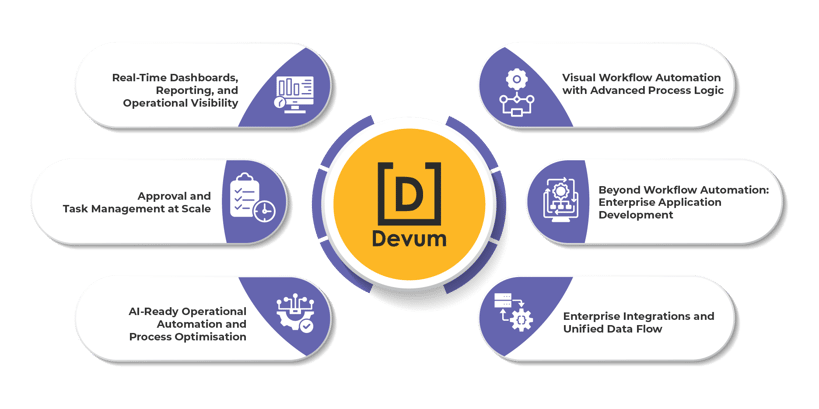
Figure 1: Features of Devum™ Workflow Builder.
1. Visual Workflow Automation with Advanced Process Logic
At the core of Devum™ is a visual workflow automation environment that allows teams to design, configure, and optimise workflows with minimal coding effort.
Using drag-and-drop workflow builders, organisations can automate both simple and highly complex operational processes without relying entirely on development teams.
The platform supports:
-
Conditional workflow logic
-
Parallel approval paths
-
Escalation rules and SLA management
-
Loop handling and repeatable workflow actions
-
Role-based task routing
-
Event-triggered notifications and alerts
-
Multi-stage approval workflows
-
Dynamic workflow branching based on business conditions
This level of flexibility is important because enterprise workflows rarely follow fixed linear paths. Instead, processes often change based on operational conditions, departments, risk levels, compliance requirements, or approval hierarchies.
In addition, Devum allows operations teams to participate directly in workflow creation and optimisation. Therefore, businesses can reduce dependency on long development cycles while adapting workflows faster as operational requirements evolve.
2. Beyond Workflow Automation: Enterprise Application Development
Most workflow automation tools focus only on process routing. However, modern enterprise operations also require internal applications, operational interfaces, dashboards, and monitoring systems that work alongside workflows.
This is where Devum™ extends beyond traditional workflow management platforms.
As an IADP, Devum™ enables organisations to build workflow-driven enterprise applications using modular low-code development capabilities. Teams can create:
-
Approval management systems
-
Dispatch and logistics applications
-
Operational dashboards
-
Reporting and compliance systems
-
Inventory and maintenance workflows
-
Vendor and contractor management tools
-
Digital operational tracking systems
-
Internal coordination portals
The platform includes reusable components, configurable interfaces, visual development environments, and modular architecture that simplify enterprise application development significantly.
As a result, organisations can build connected operational systems instead of managing isolated workflow tools across departments.
3. Enterprise Integrations and Unified Data Flow
Workflow automation only delivers full value when workflows connect seamlessly with existing enterprise systems. Otherwise, organisations continue operating with fragmented data and disconnected operational visibility.
Devum™ is designed to sit at the centre of enterprise operations by supporting integrations across:
-
ERP systems
-
Databases and enterprise data sources
-
Legacy operational systems
-
Third-party applications and APIs
-
IoT and IIoT infrastructure
-
Sensors and industrial systems
-
Cloud services and external platforms
The platform also supports centralised data handling through integrated data management capabilities. This allows organisations to consolidate operational information from multiple systems into a unified environment.
Consequently, teams gain better process consistency, stronger operational coordination, and more reliable workflow execution across departments.
4. Real-Time Dashboards, Reporting, and Operational Visibility
Operational workflows require continuous visibility. Without real-time monitoring, teams struggle to identify bottlenecks, delayed approvals, workload imbalances, and process inefficiencies.
Devum™ strengthens operational visibility through:
-
Real-time dashboards
-
Workflow tracking interfaces
-
Approval queue monitoring
-
SLA and process performance reporting
-
Audit trails and compliance visibility
-
Operational KPI dashboards
-
Role-based access control
-
Exception alerts and notifications
This allows operations leaders to monitor workflow execution, approval stages, operational performance, and process bottlenecks within a centralised environment.
Unlike static reporting systems, the platform supports live operational visibility. Therefore, teams can make faster decisions and respond to workflow disruptions proactively.
You can explore the complete case study here.
5. Approval and Task Management at Scale
Approval routing sits at the centre of most enterprise workflow automation initiatives. However, many platforms struggle when approval structures become complex.
Devum™ supports enterprise-scale approval and task management through:
-
Multi-level approval chains
-
Delegation workflows
-
Escalation handling
-
Conditional task routing
-
Department-specific workflows
-
Approval hierarchy management
-
Automated reminders and notifications
-
Centralised task orchestration
These capabilities help organisations standardise internal processes while reducing manual follow-ups and coordination effort.
As transaction volumes increase, the platform maintains workflow reliability without creating operational bottlenecks.
6. AI-Ready Operational Automation and Process Optimisation
Modern workflow automation is evolving beyond static process execution. Increasingly, organisations expect platforms to support intelligent operational optimisation.
Devum™’s architecture supports future-ready operational capabilities such as:
-
Process anomaly detection
-
Workflow optimisation insights
-
Operational analytics and trend monitoring
-
Intelligent decision support
-
Workflow performance analysis
-
Data simulation and testing environments
In addition, the platform includes capabilities for solution testing, operational modelling, and process simulation. This helps organisations validate workflows before large-scale deployment and improve operational reliability over time.
Why IADP Platforms Represent the Future of Enterprise Automation
Enterprise operations are becoming increasingly interconnected. However, many organisations still rely on disconnected tools for approvals, reporting, ticketing, workflow management, dashboards, and operational coordination.
Over time, this creates:
-
Fragmented operational visibility
-
Integration complexity
-
Data inconsistency
-
Higher maintenance overhead
-
Reduced process scalability
IADP platforms address this problem by combining workflow automation, low-code development, operational visibility, integrations, and enterprise application management within a single scalable environment.
This unified architecture becomes especially important for industries such as mining, manufacturing, logistics, construction, utilities, and other operationally intensive sectors where workflows do not exist in isolation.
Instead of managing multiple disconnected systems, organisations can orchestrate workflows, applications, operational dashboards, and enterprise processes through one platform ecosystem.
That is where Devum positions itself differently from traditional workflow tools. Rather than functioning only as a workflow automation platform, it enables organisations to build scalable operational ecosystems designed for enterprise-grade process orchestration, visibility, and long-term digital transformation.
Conclusion
Workflow automation is no longer just about improving efficiency. Today, it helps organisations build scalable, connected, and agile operations. As workflows become more complex, manual processes create delays, reduce visibility, and slow decision-making.
Low-code IADP platforms are changing this approach by combining workflow automation, application development, integrations, and operational visibility within one environment. Platforms like Devum™ help enterprises automate workflows faster, streamline operations, and build scalable internal systems without lengthy development cycles.
As enterprise automation evolves, low-code IADP platforms will become a core foundation for modern operational management and digital transformation.
Frequently Asked Questions
1. What is low-code workflow automation?
Low-code workflow automation helps organisations automate approvals, task routing, notifications, and business processes using visual development tools instead of extensive coding. Teams can build workflows faster using drag-and-drop builders, business rules, and integrations.
2. Why do businesses use low-code workflow automation?
Businesses use low-code workflow automation to reduce manual work, improve process visibility, speed up approvals, and minimise operational errors. It also helps teams adapt workflows quickly as business requirements change.
3. How is low-code different from no-code workflow automation?
No-code platforms are designed for simple workflows with limited flexibility. In contrast, low-code platforms support advanced logic, enterprise integrations, custom workflows, and complex operational processes while still reducing development effort.
4. Why are IADP platforms suitable for enterprise workflow automation?
Industrial Application Development Platform (IADP) solutions support workflow automation alongside dashboards, integrations, operational monitoring, and custom application development within one environment. Therefore, they are well-suited for complex enterprise and industrial operations.
5. What is a good platform for low-code workflow automation?
A good low-code workflow automation platform should support visual workflow design, advanced approval routing, real-time dashboards, ERP integrations, and enterprise-scale process automation within a unified environment.
For industrial and enterprise operations, Industrial Application Development Platform (IADP) solutions are often more suitable because they combine workflow automation, operational visibility, system integrations, and application development capabilities in one platform.
For example, Devum is designed as an IADP that helps organisations build workflow automation systems, operational dashboards, and enterprise applications for industries such as mining, manufacturing, logistics, and other operational environments.

Start your journey with Devum™ today. Sign up and build your first application.
👉 Subscribe to Devum™: https://Try.Devum.com/#/security/SignUp